
CareCloud CDP Tutorials
Create an Engaging Travel Loyalty Program: A Step-by-step Guide
By Sabina Bednářová 6. 7. 2026 Tutorials Automation, Customer Data, Emailing, Loyalty
Discover how to build a travel loyalty program that truly engages customers. In this article, we will guide you step-by-step through setting up a loyalty program, from defining the value of points to creating personalized email campaigns that trigger and motivate travelers.

THE FOUNDATION OF TRAVEL LOYALTY PROGRAM
Our fictional travel agency, Skimora, is launching a new loyalty program designed to reward customers for their bookings and enrich every step of their travel journey. While there are many types of loyalty programs, this guide focuses on the points-based model.
We’ll start by:
- Defining a simple points system: 1 point for every 10 € spent, redeemable for rewards like a 50 € discount on optional trips.
- Adding welcome bonuses and extra points for first-minute bookings.
- Creating audience segments and engaging email templates.
- Automating the workflow so new members receive bonus points and a personalized welcome message.
PROGRAM BASICS
Before setting everything up, it’s important to start with the basics. Every successful loyalty program begins with a clear idea of what customer data you want to collect.
For a travel agency, this might include asking customers about their preferred type of holiday (active trips, city breaks, beach stays, and so on), their favorite destinations, or even their preferred means of transport.
In CareCloud, this information can be stored as customer properties. Once defined, they provide a solid foundation for precise segmentation and more personalized campaigns. If you’d like to dive deeper into this topic, access our dedicated tutorial here.
Now, let’s move on to the first step of this guide.
LOYALTY POINTS CONFIGURATION
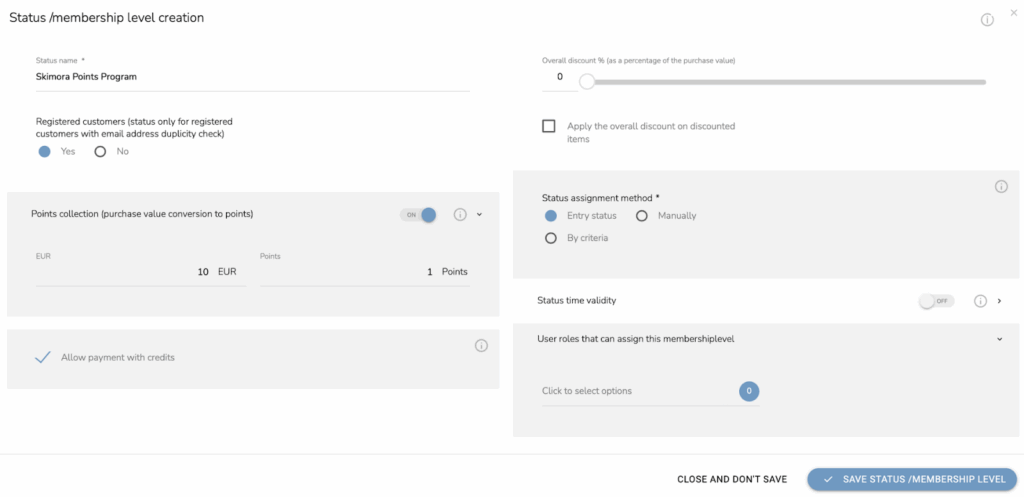
In the Loyalty & Administration app, navigate to Statuses / Membership levels. Here you can configure the program to your needs. In our example, customers earn points that they can then use to get a discount on defined products (such as optional trips).
First, set it so that customers earn 1 point for every 10 € spent, and choose the “Entry status” option in the “Status assignment method” column. Refer to the screenshot below for guidance.
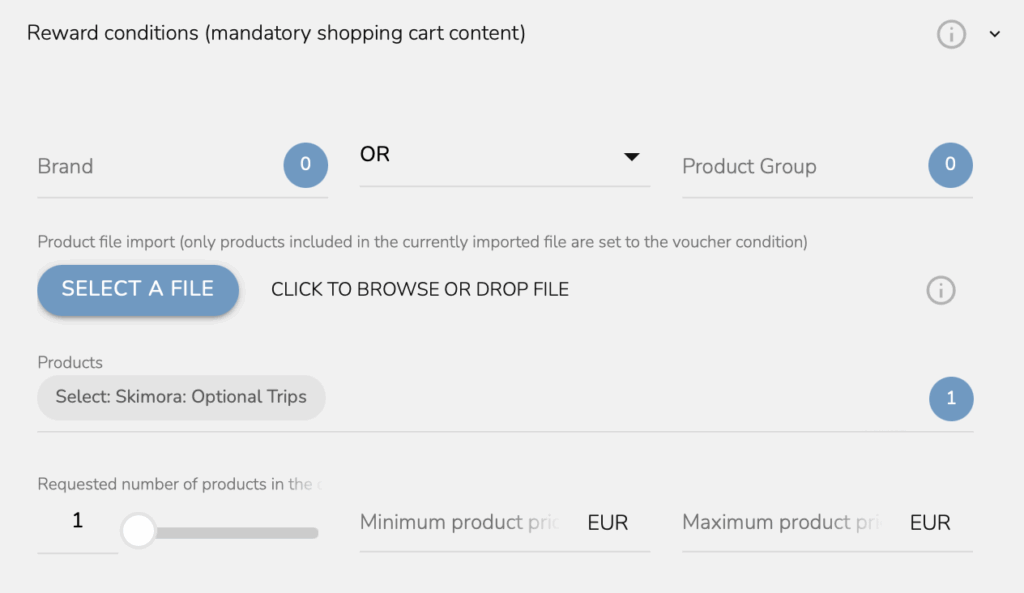
Next, move to “Catalogue Reward.” This is where you define how customers can use their points. In our case, we link the reward to optional trips.
Now, we set the discount itself: customers can redeem 500 points for a 50 € discount on an optional trip. They can use this discount twice for a single trip.
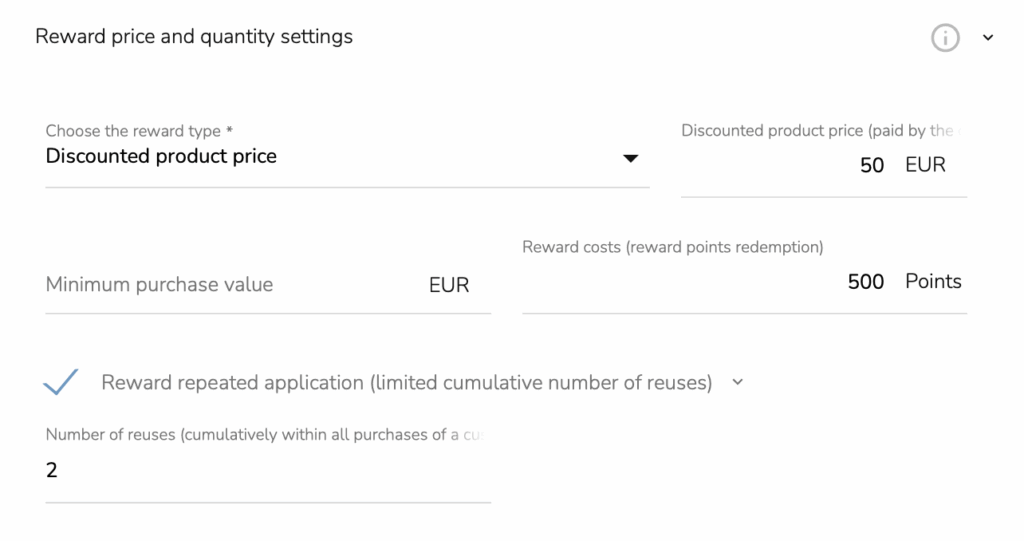
While this setup may seem restrictive, remember that you have full flexibility to adjust the rules to match your business model and customer expectations.
With the core settings in place, you can now enrich the program with welcome bonuses and special rewards that make the first booking even more exciting.
WELCOME POINTS
Every customer who registers for the loyalty program automatically receives 500 bonus points added to their profile.
To set this up, go to “Reward Points.” Enter the reward name, mark it as a system parameter, and assign it to the appropriate “Reward Points Group.” Since we are using workflows, select the “Automated Rewards Points Collection and Redemption” option. Finally, define the validity period for these points in months.
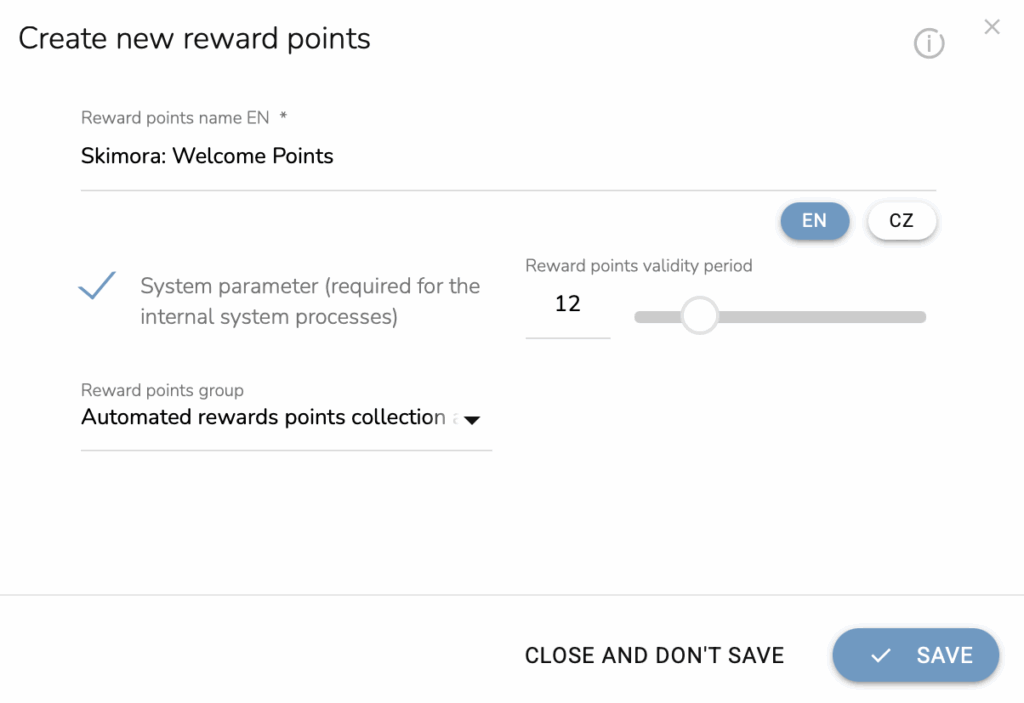
The welcome points are now ready to be used in an automated workflow. Before we get there, however, we need to complete a few more steps.
SIMPLE BONUS SETUP
Customers will earn double points for every first-minute booking. You can also apply the same principle to award bonus points for repeat bookings or additional services.
Go to Reward Points and select “Reward Points Purchase Bonuses.” This configuration requires a bit more attention.
Start by choosing “Proportional” to the product price and set the points value to 2x. Then, open the “Product Group” and select “First Minute Trip.” Keep in mind that the product group must be created in the Loyalty & Administration app beforehand.
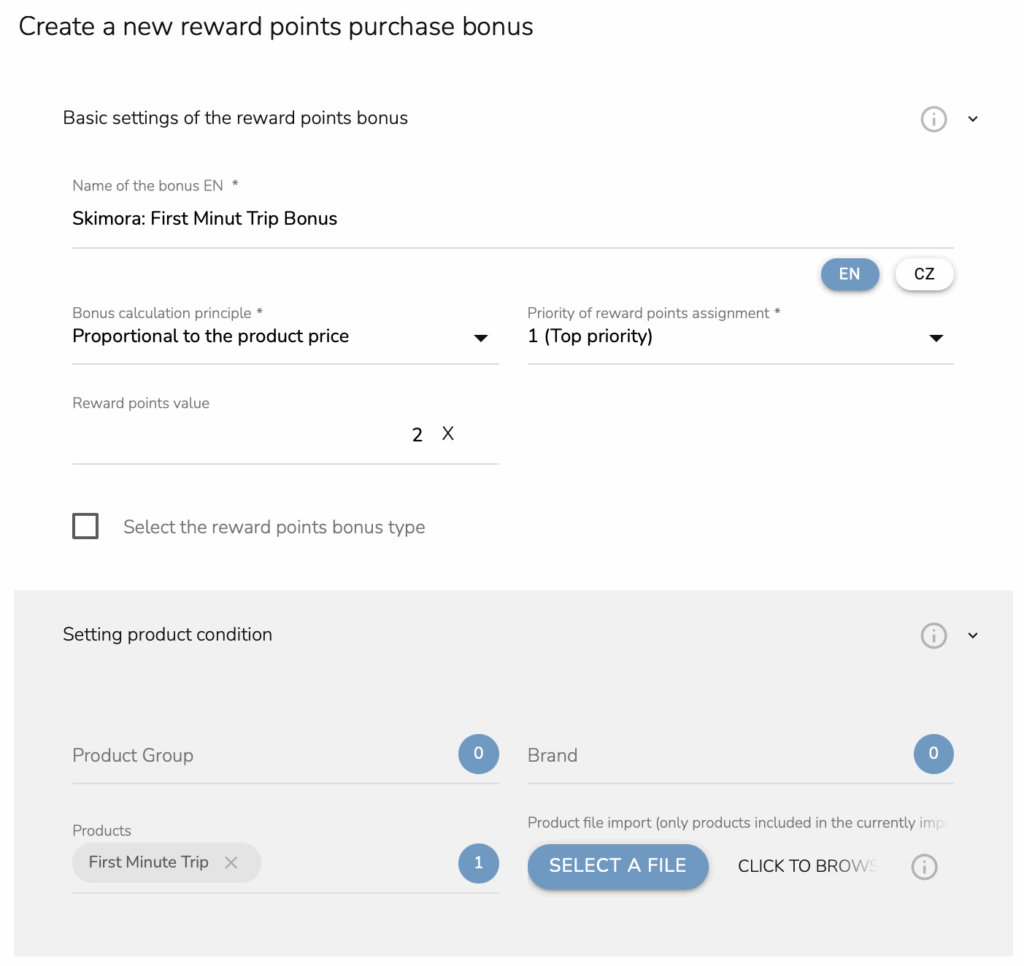
With this setup complete, the main configuration is ready, and we can now move on to the announcement stage.
CHOOSE YOUR CUSTOMERS
Travel agencies often work with databases containing hundreds or even thousands of customers. To ensure that emails about the new loyalty program don’t end up in spam, it’s best to target only active customers, specifically those who have traveled with your agency within the last three years.
To do this, open the Campaign & Audiences app and navigate to “Emailing, Audiences.” Select RFM criteria, choose “Recency,” and set the filter to three years from the last purchase.
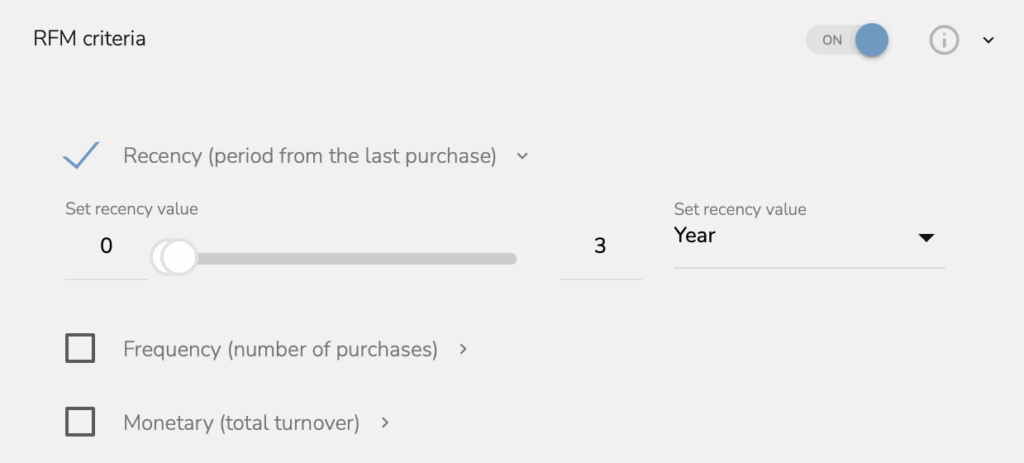
With this, your audience is defined and ready, allowing us to move on to the more creative part of the process.
ANNOUNCE AND WELCOME EMAILS
You will need two email templates: one to announce the loyalty program launch, and another to welcome new members after registration.
In the announcement email, clearly highlight the key benefits and explain how points can be redeemed, for example, for one-day trips, travel insurance, or access to airport lounges. This ensures customers immediately see the value of joining.
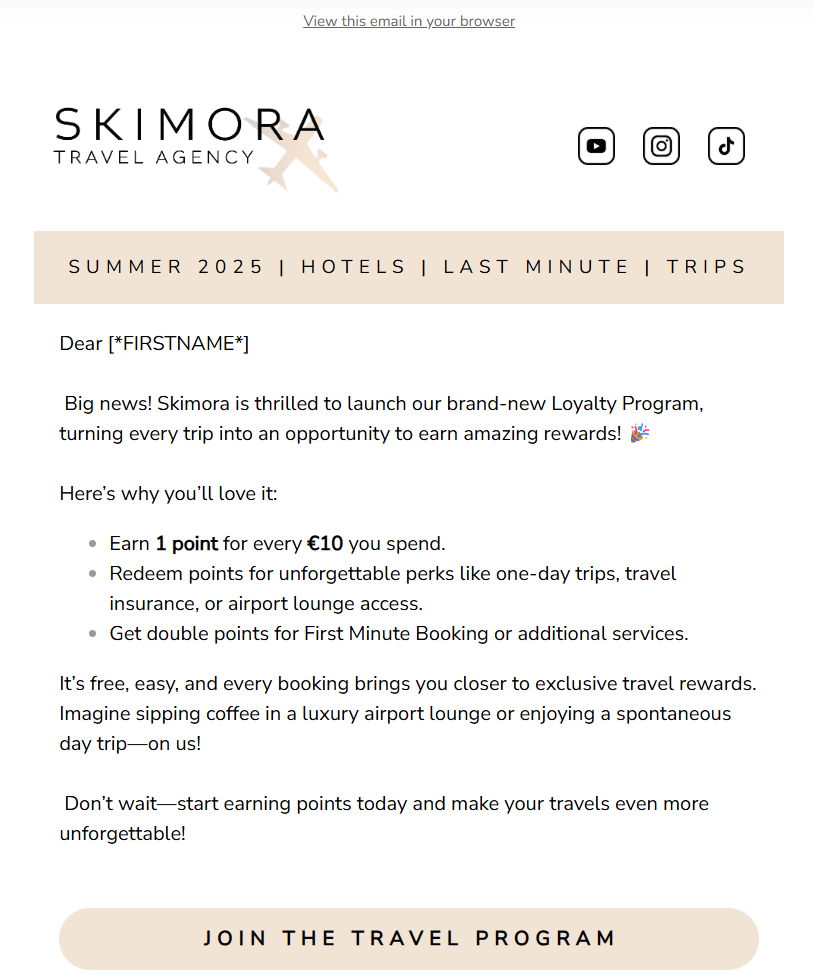
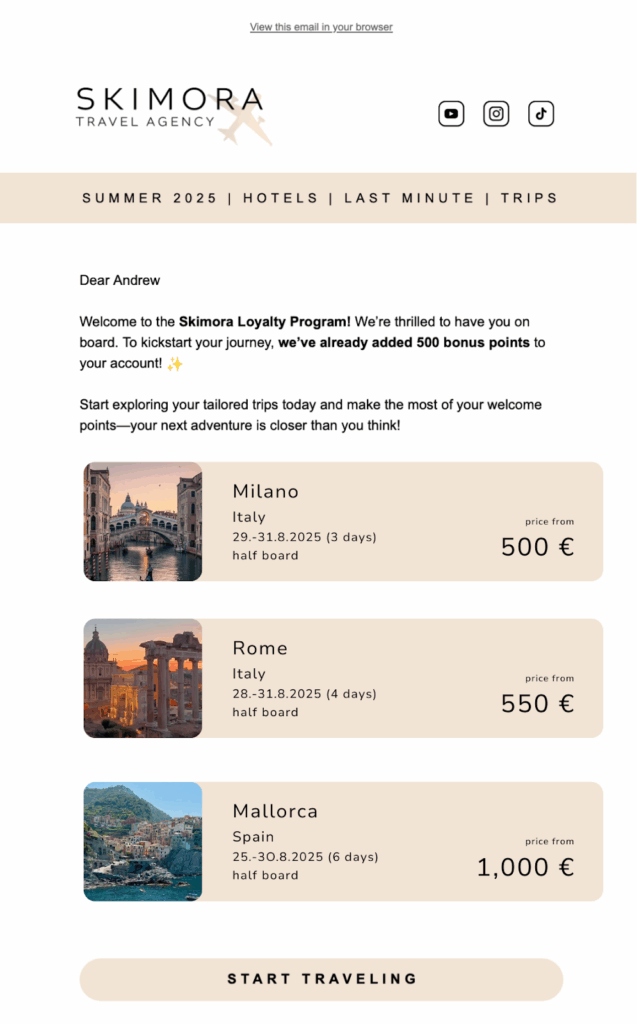
The welcome email should warmly greet the customer and confirm their successful registration. Don’t forget to mention the extra bonus points that have been added to their account as part of the welcome reward.
Encourage engagement by adding a personalized travel offer based on each customer’s past bookings. You can easily set this up by using the Recommendation Engine and adjusting its parameters and layout to fit your needs.
SET THE ANNOUNCEMENT CAMPAIGN
In the campaign settings, select the audience you created and choose the first email template.
Then, choose the “Postpone and set the launch time” option to schedule the campaign launch at your preferred time.
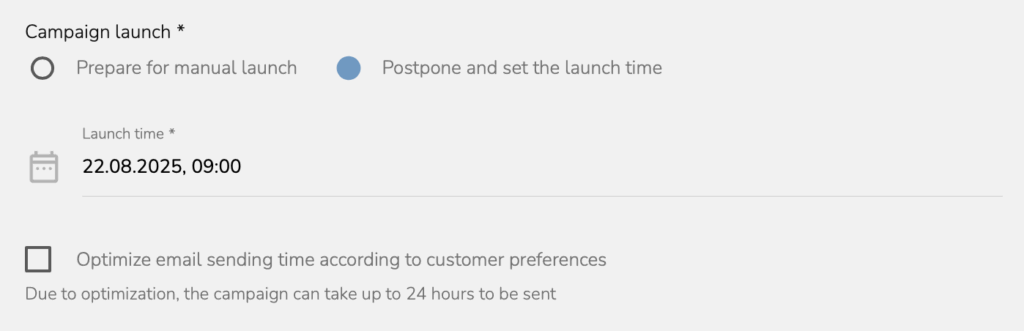
But before the campaign officially launches, we need to set up the workflow that will welcome new members.
WELCOME WORKFLOW
This workflow is straightforward and easy to set up. It starts as soon as a customer joins the loyalty program. First, the system checks whether the customer’s email address is available. This is only a safety check, since the email is already required during registration. Next, we will assign the extra points to the customer.
The system then waits until work hours and sends the welcome email we created earlier.
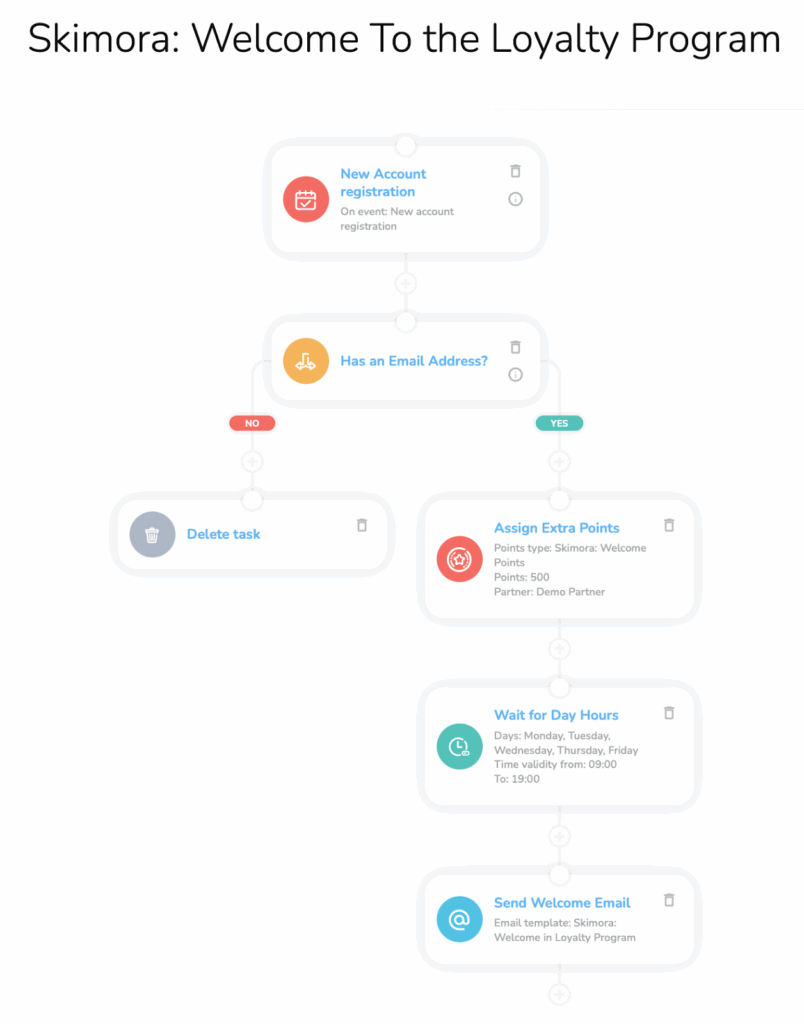
There is only one important node we need to look at: Assign reward points to the customer. Here, you need to find the points group we have already created and set 500 points.
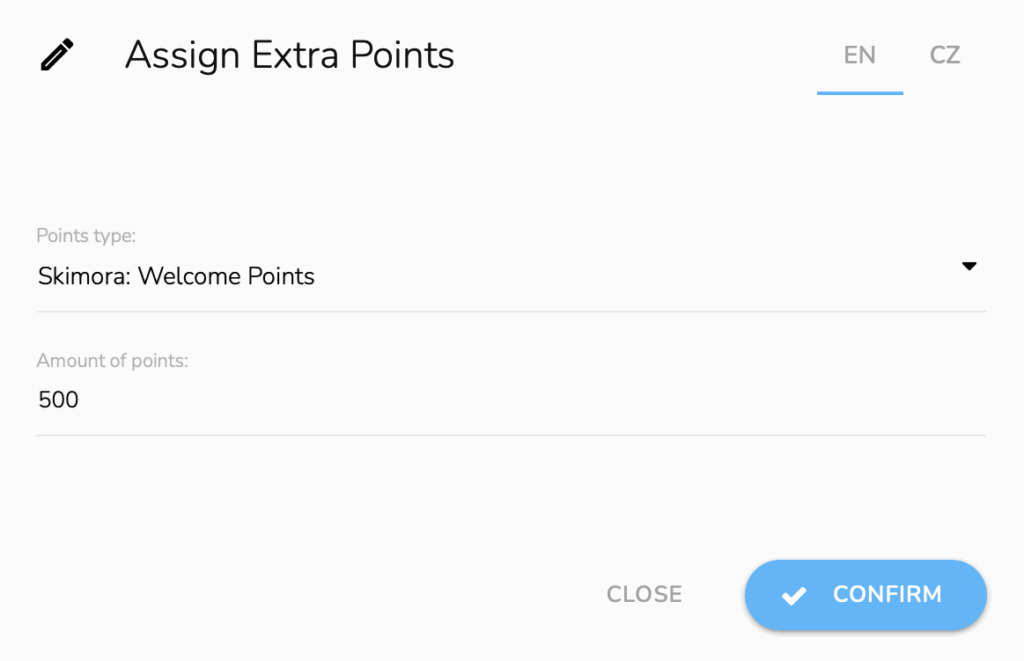
With the workflow done, your loyalty program is ready to launch.
POWER YOUR LOYALTY PROGRAM WITH CARECLOUD
Launching a successful loyalty program isn’t just about points and emails. It’s about using the right tools to make every customer interaction meaningful.
CDP & CRM CareCloud provides a unified platform to manage your loyalty program seamlessly. You can store customer preferences, track travel history, and set up automated workflows that deliver welcome emails and bonus points effortlessly.
With CareCloud, segmentation becomes precise, allowing you to target your most engaged travelers with personalized offers. Recommendation engines help suggest trips or services based on past behavior, while automated reward settings ensure your customers receive the right incentives at the right time.
With CareCloud, you don’t just manage a loyalty program. You build a system that drives repeat bookings, nurtures customer relationships, and turns every trip into a reason to return. CareCloud gives travel agencies the complete set of tools to design, automate, and scale loyalty programs that truly work.
RECOMMENDED
What is hot?
Emailing remains one of the most powerful ways for travel agencies to…
Engage customers while they browse your website or online shop, and personalize…
A New Core App: Web Overlays Our brand-new app will completely transform…
Marketing and psychology go hand in hand. To drive retention and boost…
Back-to-school campaigns only work when they target the right audience at the…