
CareCloud CDP Tutorials
Motivate Customers to Grow Their Membership with an Easy Automation
Da Jan Doleček 28. 5. 2026 Tutorial Automazione, Invio di e-mail, Fedeltà
Create an automated campaign that motivates customers toward reaching a higher membership level. If the customer hesitates, send them a custom reward as the last “push”. This tutorial maps out the entire process, from email design to automation.

BUILDING LOYALTY WITH AUTOMATION
Membership levels are an important part of loyalty management. With higher levels, customers strengthen their loyalty to your brand and buy more. Once customers reach the VIP level, they are less likely to abandon the brand. Still, some customers require motivation to make the final push and reach a higher level. That is where a well-designed, automated campaign helps.
HOW THE PROCESS WORKS
Our mock brand, “Quofi,” offers multiple membership levels based on purchases made over the past 6 months. To reach the higher “Quonnoisseur” level, a customer must buy 6 coffee packages over these 6 months. When a customer buys five packages, an automated response will prompt them to buy the sixth.
We will need to design emails, rewards, and automation triggers in the CareCloud platform:
- Designing emails: The “You’re almost there” email showcases the benefits of the Quonnoisseur tier to hook customers, while the next two emails motivate and urge them further.
- Vouchers: Part of the motivation is a 20% discount on coffee packages.
- Automation Workflow: The logic triggers when the customer is getting near the new membership level.
EMAIL CREATION
The first email will be sent immediately after the fifth purchase and will primarily showcase the Quonnoisseur level, including free shipping, 10% off coffee packages, and monthly gifts.
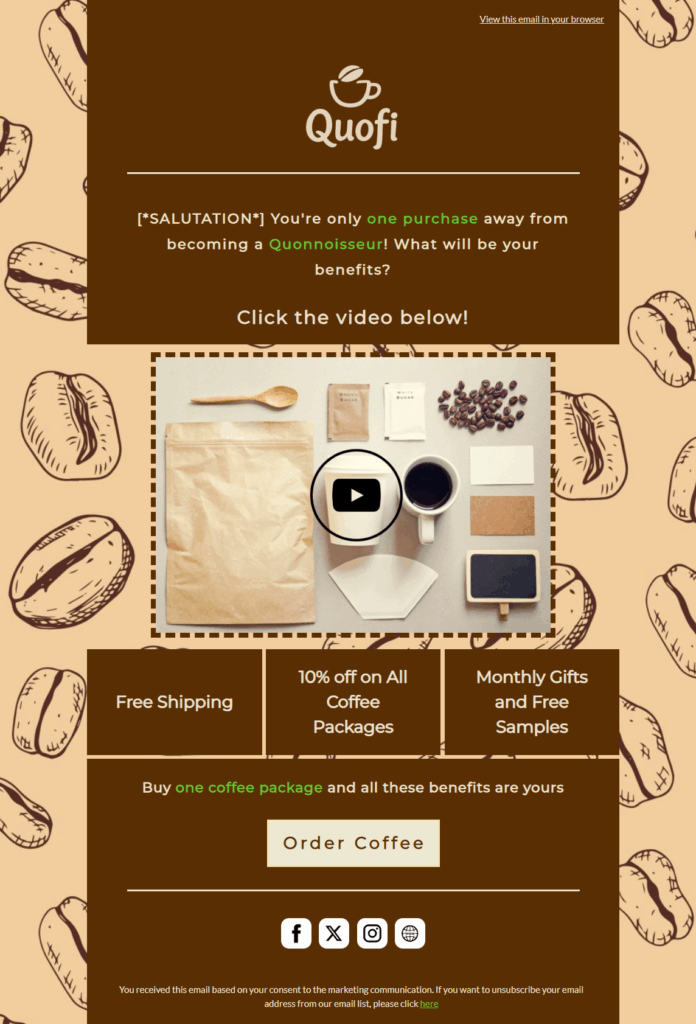
The email serves to inform customers and create a sense of urgency, highlighting the benefits, while offering a button with a link to the online shop.
The second email, “Quofi Upgrade Level Voucher,” encourages the customer with a 20% voucher reward to complete the purchase. We will ensure that the voucher code, countdown timer, and a link to the online shop are included.
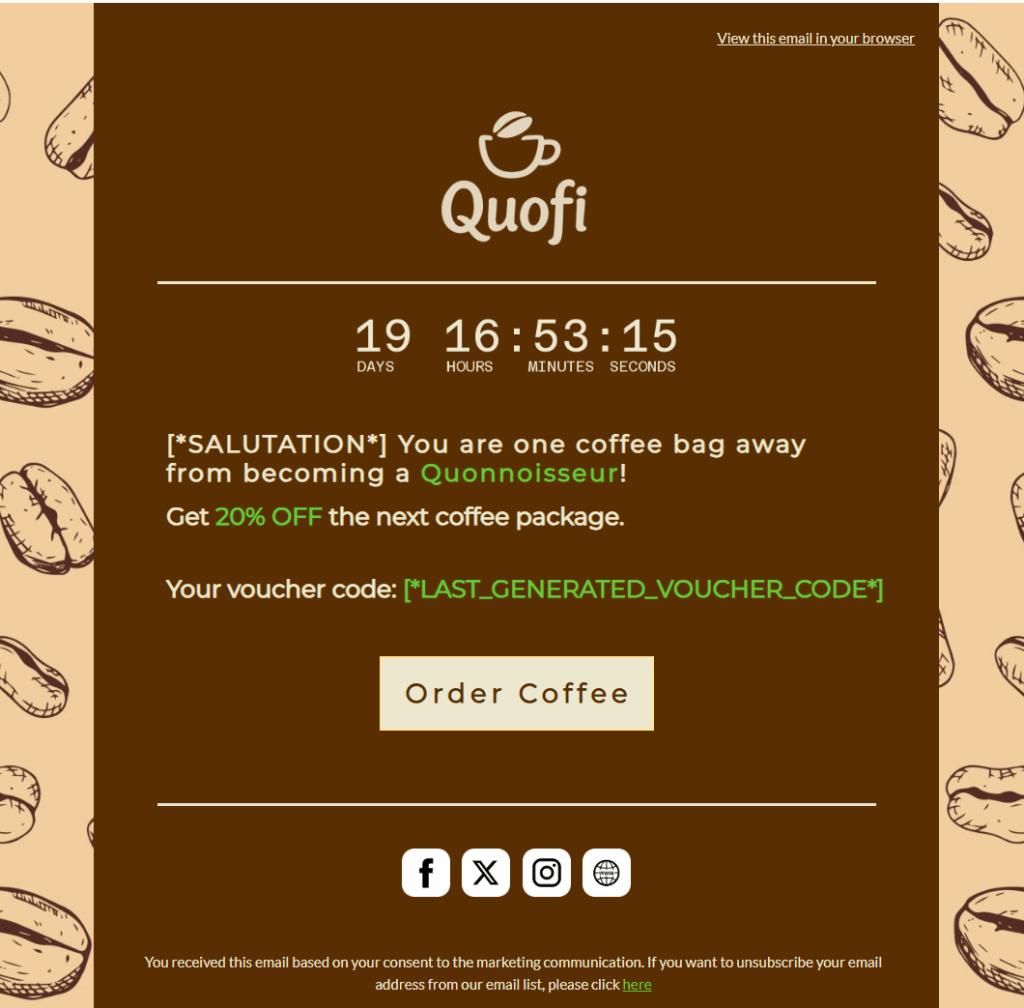
Tip #1: Use personalization variables to enrich the email. Besides custom greetings, you can use a personalized countdown (that is linked to the last assigned voucher). To include the voucher itself, use marketing variables.
The last email, “Quofi Upgrade Status, Last Chance,” urges customers to buy one week before the voucher’s expiration. We’ll make the countdown more prominent; otherwise, the emails should be short and dynamic.
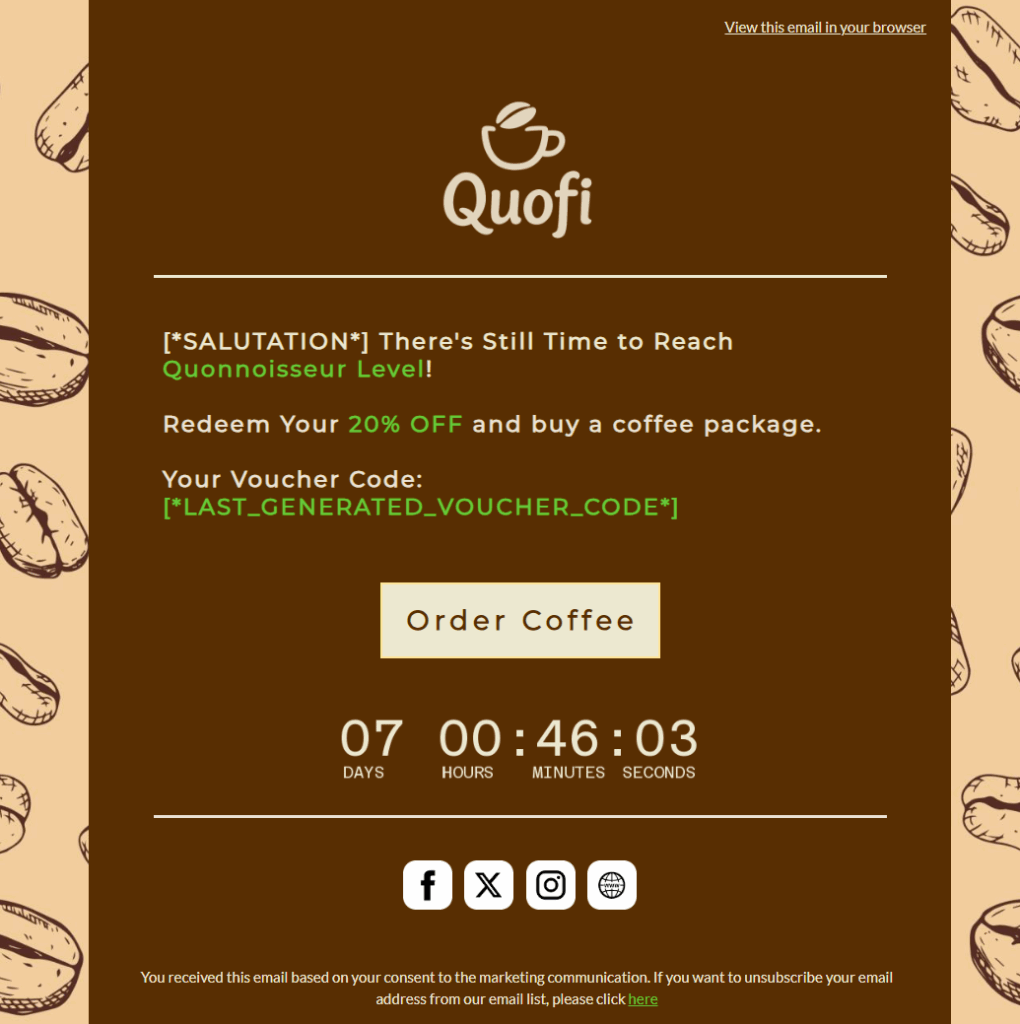
These three emails will be the basis of our campaign. Now we move to creating the discount voucher.
VOUCHER SETTINGS
Another major step is designing the reward voucher that motivates customers to make the last purchase required to reach a higher level. To create vouchers tied to marketing automation, we go to Loyalty & Administration > Loyalty settings > Rewards/Vouchers > Campaign rewards.
Our voucher, “Quofi Upgrade Level Incentive,” offers a 20% discount on Quofi bean packages, with a minimum order value of 30€, equivalent to the price of one coffee bean package.
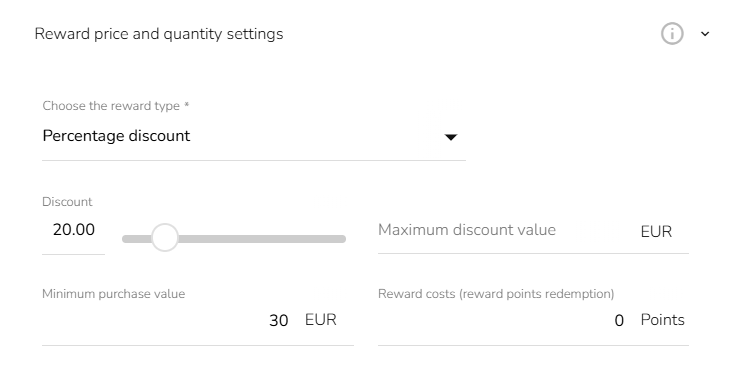
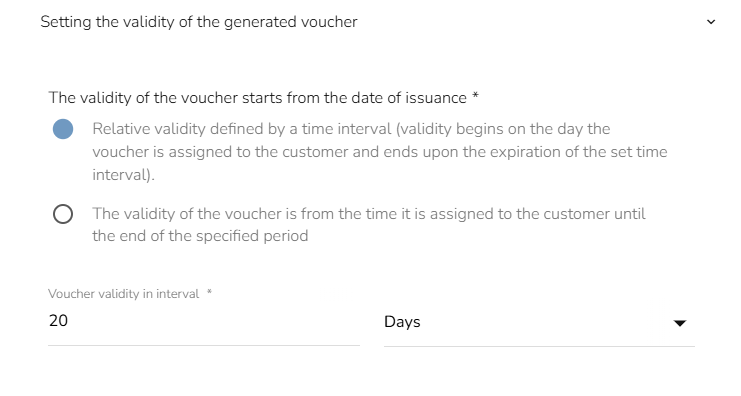
In another important step, we set the voucher’s validity to 20 days from the moment of assignment. Be sure to set the validity to “Relative.”
Then we will choose which products to discount. In our case, the relevant product group is Quofi bean packages.
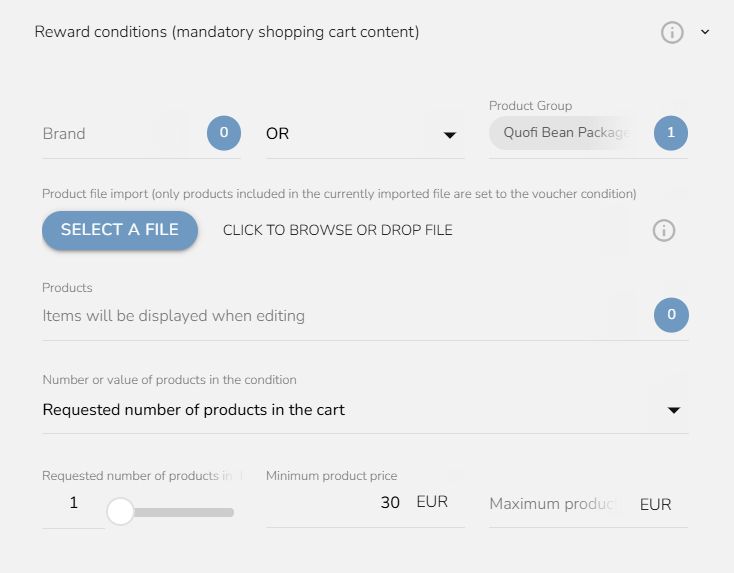
Since the voucher is tied to automation, there is no need to add more conditions. These conditions will be built into the automation itself.
THE AUTOMATION WORKFLOW
Now, we will craft the short automation workflow, “Upgrade Membership,” which includes all the previous parts. The whole workflow looks like this:
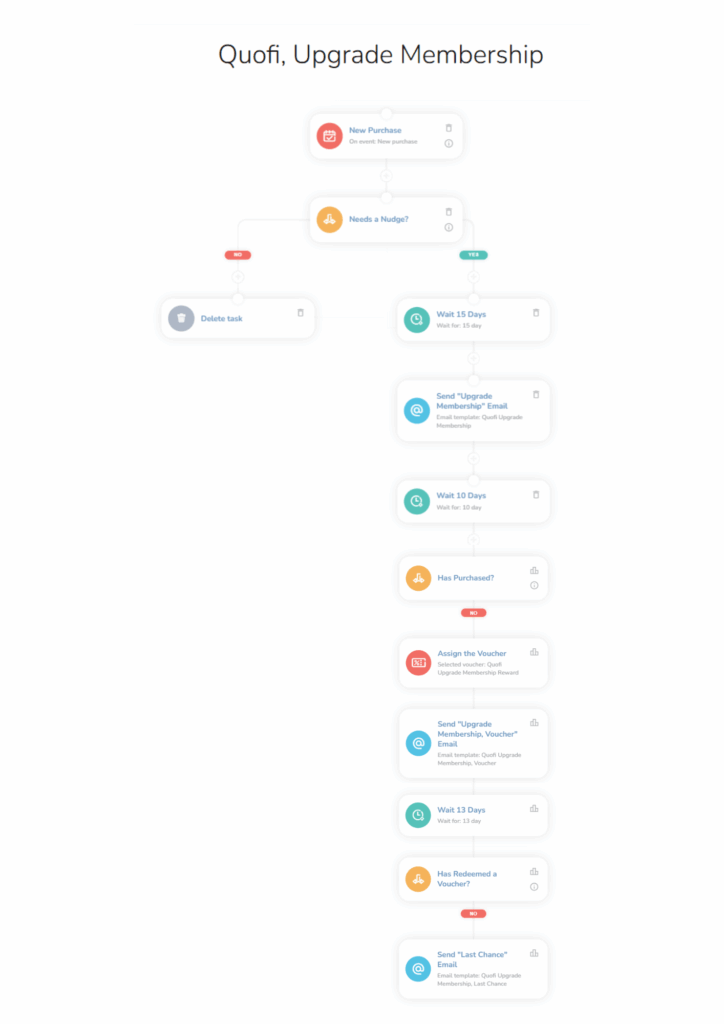
The “Upgrade Membership” workflow has several conditions. The trigger will be a standard “New Purchase” event. The following condition node looks like this:
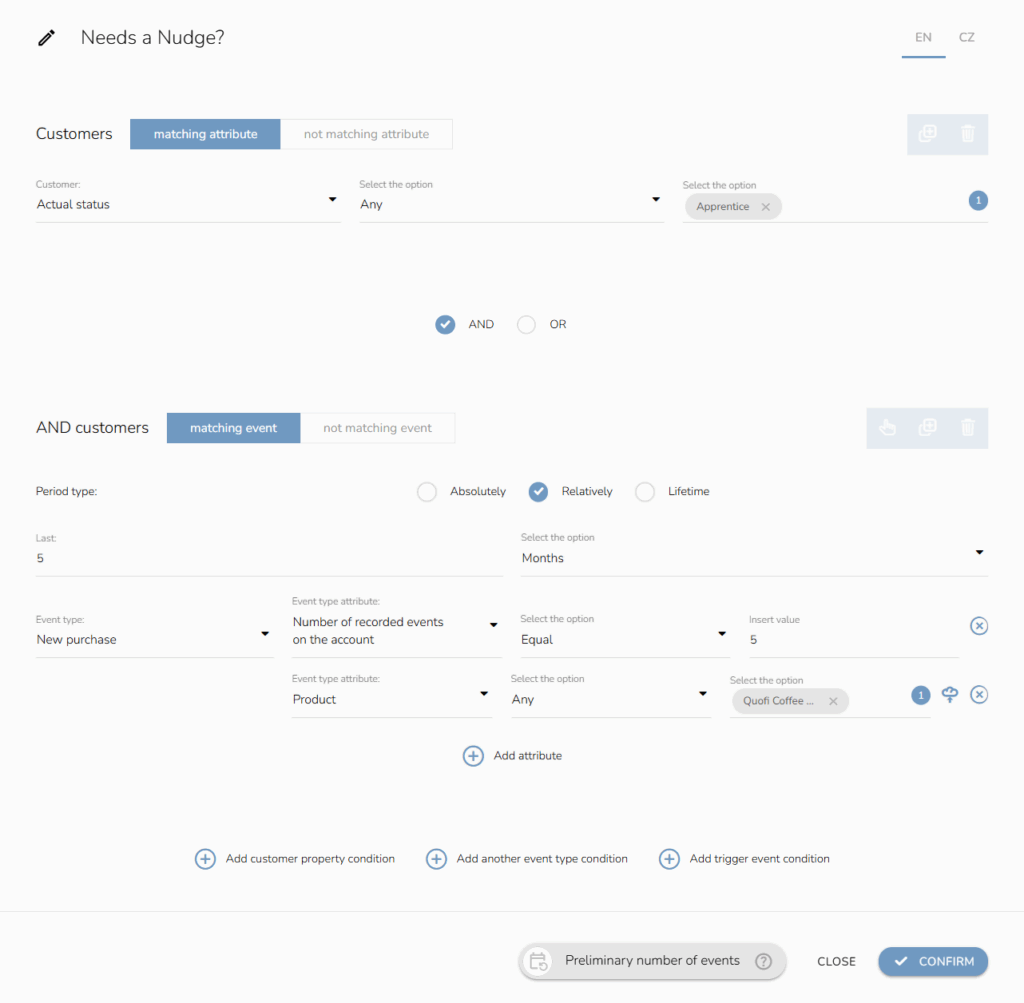
The two conditions check whether the customer belongs to the lower level, “Apprentice,” and whether the customer has made five purchases in the last five months. We will also add an attribute to check only for Quofi bean packages.
The last condition ensures that the customer does not receive this automated campaign after every purchase. To do that, we set the event type to exclude customers who were assigned the specific “Upgrade Status” reward in the last 6 months.
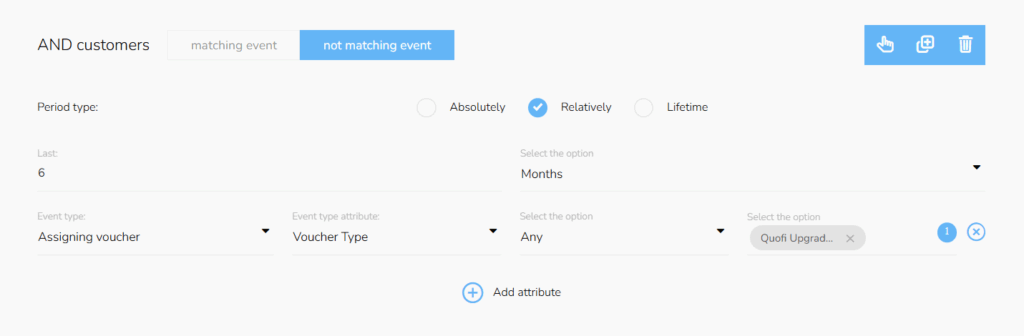
If the customer meets these conditions, they will receive the first email via the “Send email” node after 15 days (via “Waiting node”). We will wait a while to see if the customer has made a purchase without needing a voucher. After that, we will set another 10-day waiting period.
With the next condition node, we will check if the customer has made a purchase within those 10 days. We will use the “New purchase” event type as before, but set the relative timespan to the last 10 days and specify the product category.
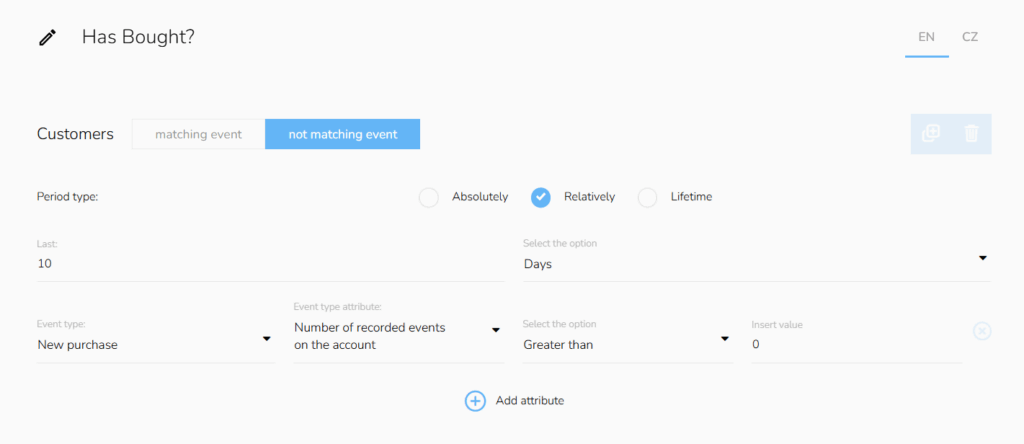
If the customer has bought, the workflow ends, and we celebrate a new Quonnoisseur; however, if the customer still hesitates to buy, we will assign them the voucher and send them the appropriate “Upgrade Membership, Voucher” email. Now, another Waiting period of 13 days will follow.
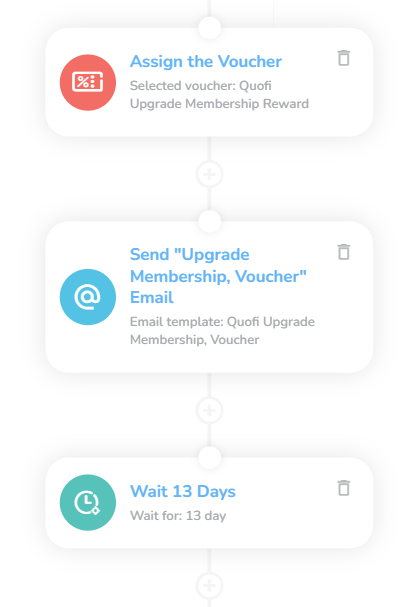
After this period, the last phase begins. If the customer has bought, we will have successfully gained a new Quonnoisseur (on creating tiered programs, access this tutorial), and the workflow ends. If not, we will add another condition.
The safest way is to use the “Applying a voucher” event type and choose the specific Quofi voucher. That means the customer has bought and used the voucher as well.
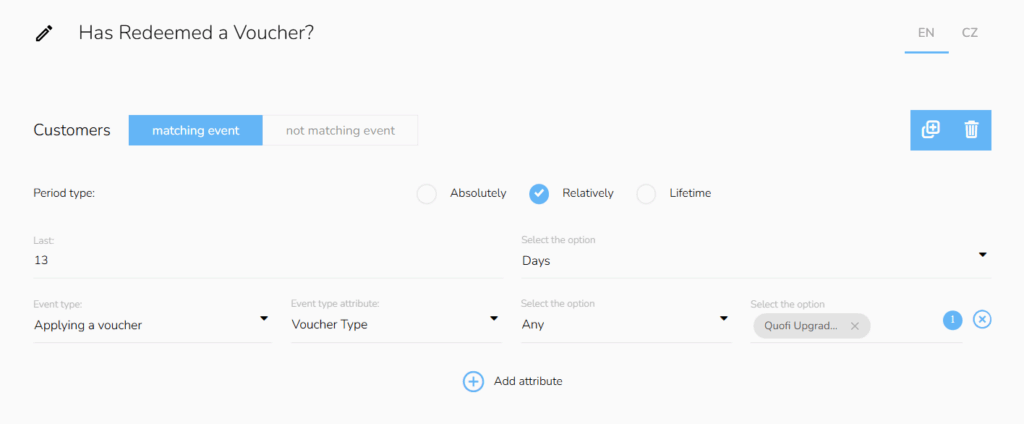
If the customer has not made a purchase, send the “Last Chance” email to attempt the last push before the workflow ends.
MARKETING THRIVES ON AUTOMATION
You need effective marketing to increase ROI, purchase frequency, and retention rate. CareCloud apps give you the capabilities to craft fully automated campaigns that expand your reach and take repetitive tasks out of your hands.
With this simple automation, you increase the chances of building a loyal following that actively engages with your brand. Explore other tutorials and elevate your marketing to new standards to boost your profits.
CONSIGLIATO
Che cosa è caldo?
Emailing remains one of the most powerful ways for travel agencies to…
Engage customers while they browse your website or online shop, and personalize…
A New Core App: Web Overlays Our brand-new app will completely transform…
Marketing and psychology go hand in hand. To drive retention and boost…
Back-to-school campaigns only work when they target the right audience at the…