
CareCloud CDP Tutorials
How to Use Pass Machine for Restaurant Loyalty Campaigns: A Practical Tutorial
Da Sabina Bednářová 19. 3. 2026 Tutorial Fedeltà, Omnichannel
Digital loyalty cards are easy. Turning them into a real growth channel is not. In this tutorial, we’ll show how restaurants can connect PassMachine with CDP & CRM CareCloud to turn simple wallet cards into a data-driven loyalty channel that actively drives repeat visits, targeted engagement, and higher revenue.
USING PASSMACHINE FOR RESTAURANT LOYALTY
PassMachine is an independent solution that lets restaurants create and update digital loyalty cards for Apple and Google Wallets without an app or complex setup. Guests simply add the card to their mobile wallet, where rewards, points, and offers are refreshed in real time.
On its own, PassMachine works as a simple digital loyalty card for mobile wallets. Connected with CareCloud, it becomes a data-driven loyalty channel, enabling segmentation, automation, personalized communication, and multi-channel engagement.
In this tutorial, we’ll show how The Round Table restaurant uses PassMachine together with the CareCloud platform to invite their most loyal guests to an exclusive tasting event. You’ll learn how cards are issued and how to build a complex PassMachine campaign in just a few steps.
ASSIGN LOYALTY CARDS
Before launching the campaign, we need to send each guest a PassMachine loyalty card. The first step is creating a card template in the PassMachine interface, including its design and required data fields. The cards will then be automatically sent to customers via a simple workflow in CareCloud.
The workflow is triggered automatically after customer registration and verification. At that moment, the system checks whether the email address is available. If so, the PassMachine card is sent directly to that email address. If the email is missing, the workflow checks for a phone number and sends an SMS asking the customer to provide their email so the card can be delivered.
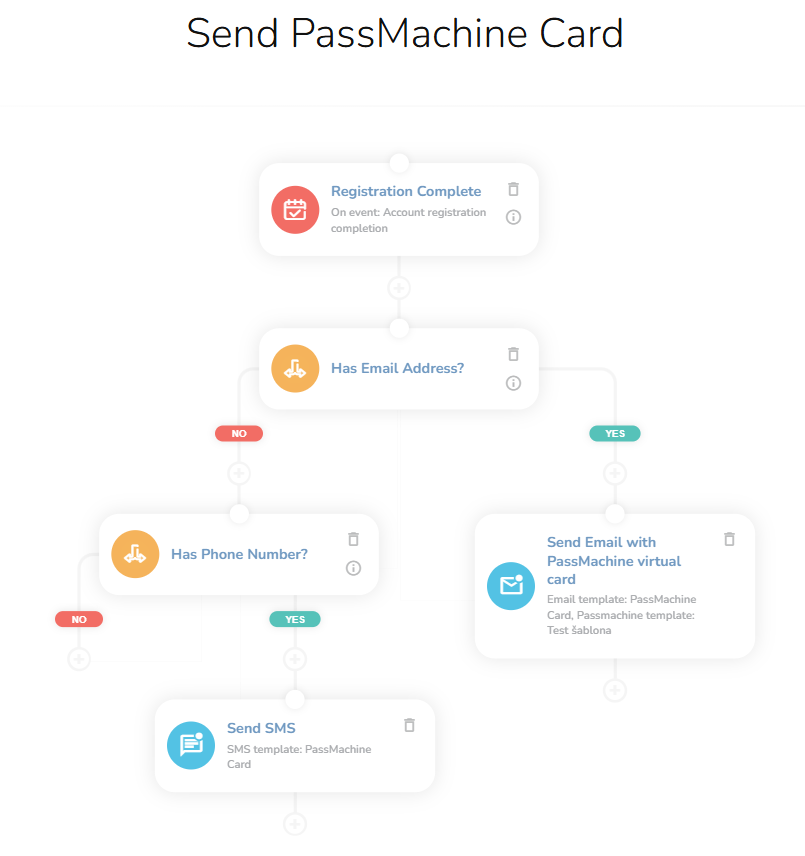
Although the workflow is simple, it ensures that every customer receives the card through a verified communication channel. Now that loyalty cards have been successfully issued, we can move on to targeting the right audience.
SELECT YOUR AUDIENCE
As we said at the beginning, The Round Table is hosting a tasting event with limited capacity, so the goal is to invite only guests who regularly visit the restaurant. To achieve this, we use the RFM segmentation in CareCloud.
Go to the Campaign & Audience app. Find the PassMachine section and choose Audiences. Here, you click on the Selection of customers by customer segments and badges. Choose the Champions and Loyal segments.

That´s all, and we can move to the next step.
CREATE THE PUSH NOTIFICATION
Once the audience is ready, prepare the push notification for the PassMachine cards. Open the PassMachine section and select PassMachine Campaign Templates to design your push notification.
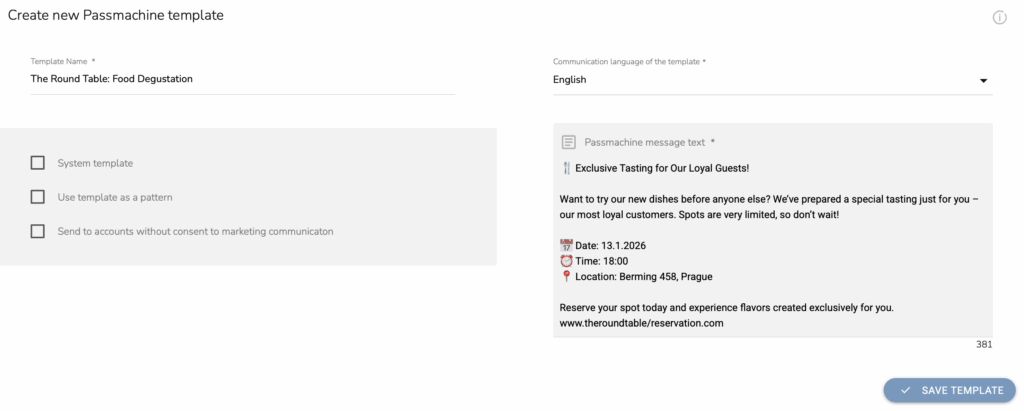
Give the template a clear internal name, choose the language, and write a short, engaging message that invites loyal guests to the tasting event. Because push notifications appear directly on customers’ lock screens, concise and relevant messaging significantly increases the chance of a quick response — especially for time-limited events like tastings.
Let´s get to the final step: launching the campaign itself.
SET UP THE CAMPAIGN
Once both the audience and the message template are ready, it’s time to launch the actual PassMachine campaign.
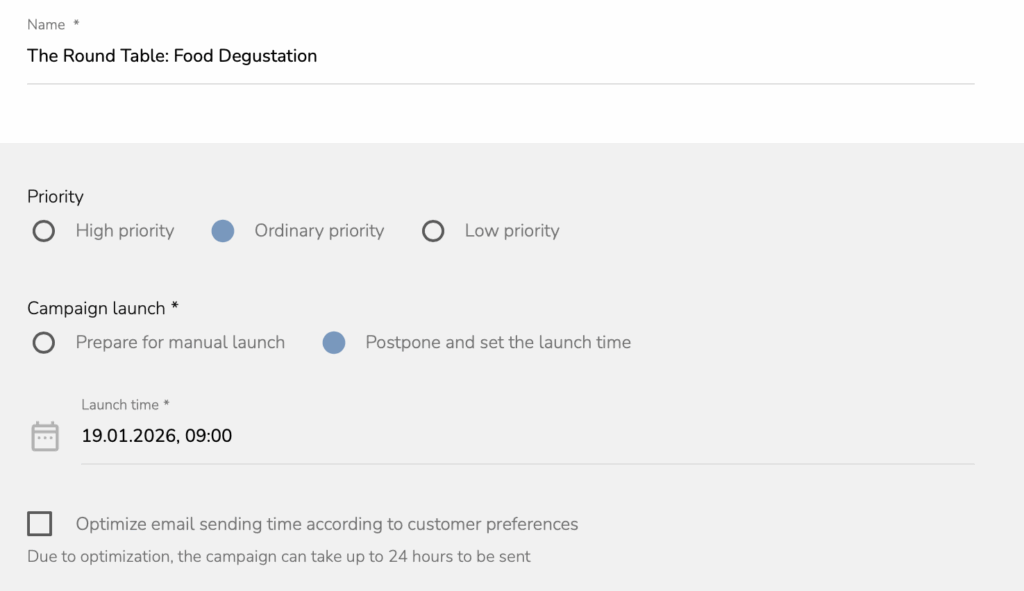
Open PassMachine Campaigns and start by naming your campaign. Then choose how and when it should be delivered — manually, at a scheduled time, or automatically based on customer preferences. After that, simply assign the audience and the template we have prepared in the previous steps.
Everything is now ready to be released to the world.
CARECLOUD & PASSMACHINE: SMARTER CUSTOMER ENGAGEMENT TOGETHER
CDP & CRM CareCloud and PassMachine work together to turn simple digital cards into a fully connected loyalty experience. PassMachine ensures the loyalty card, while CareCloud processes this data to create meaningful segments and personalized workflows.
Thanks to the integration, restaurants can trigger automated campaigns based on real loyalty card activity, reach guests across email, SMS, and wallet push from one place, and continuously improve results using unified customer data.
What was once just a digital card becomes a fully measurable, optimizable loyalty channel — one that helps restaurants fill events, reward their best guests, and build long-term relationships.
CONSIGLIATO
Che cosa è caldo?
Digital loyalty cards are easy. Turning them into a real growth channel…
Purchase is just the beginning. Today’s retention-based market is all about creating…
Are your customers slipping away? This guide shows how to reduce churn…
Il marketing di oggi ruota attorno alla fidelizzazione dei clienti attraverso una comunicazione personalizzata e l'automazione....
L'anno 2025 ha segnato una svolta significativa. CareCloud ha potenziato le sue funzionalità,...